Wi-Fi 7 Ready

Professional Wi-Fi surveys, heatmaps, and diagnostics — without the enterprise price tag.

RockWiFi™ Pro gives IT consultants, MSPs, and network admins the tools to survey, troubleshoot, and document Wi-Fi networks — with Wi-Fi 7 detection, 6 GHz band support, and 320 MHz channel analysis built in. Local-first. No cloud. Monthly subscription.
Launches August 31, 2026. Monthly subscription. No account required.

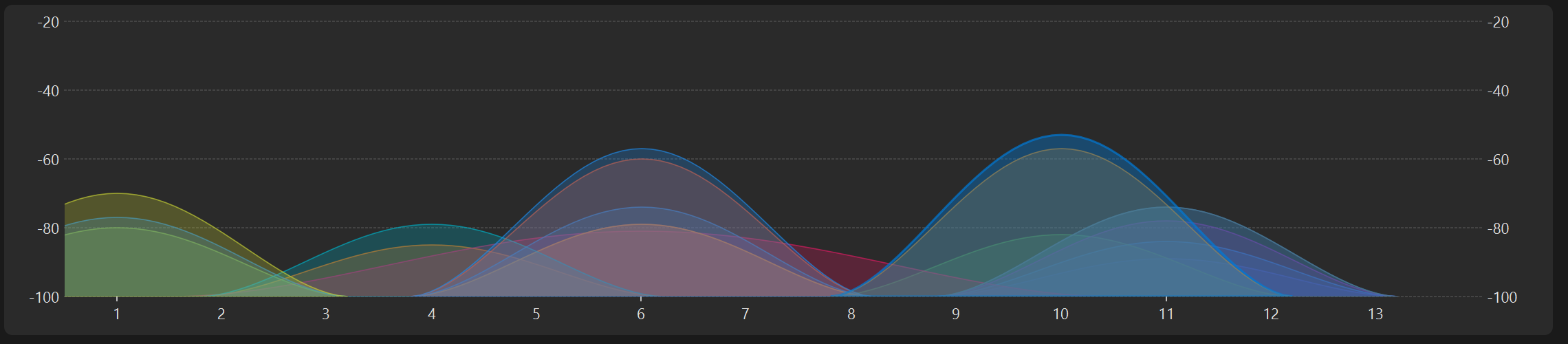
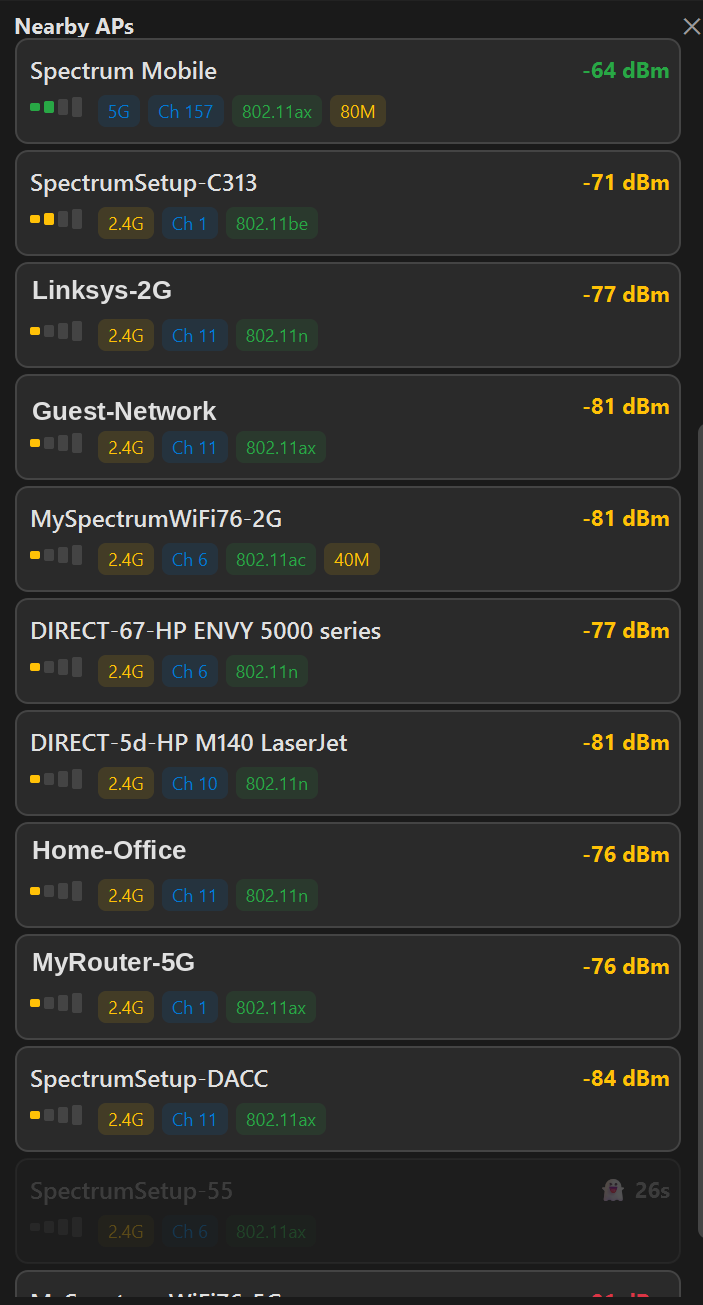
RockWiFi Pro — 2.4 GHz channel congestion analysis showing overlapping Wi-Fi networks RockWiFi — nearby access point scanner with signal strength, band, and channel details

Wi-Fi tools that belong on every tech's laptop.

Whether you're surveying a warehouse, tracking down a rogue AP, or documenting coverage for a client, RockWiFi Pro puts professional-grade Wi-Fi analysis in a single desktop app. No cloud accounts. No sending your client's floor plans to someone else's servers.

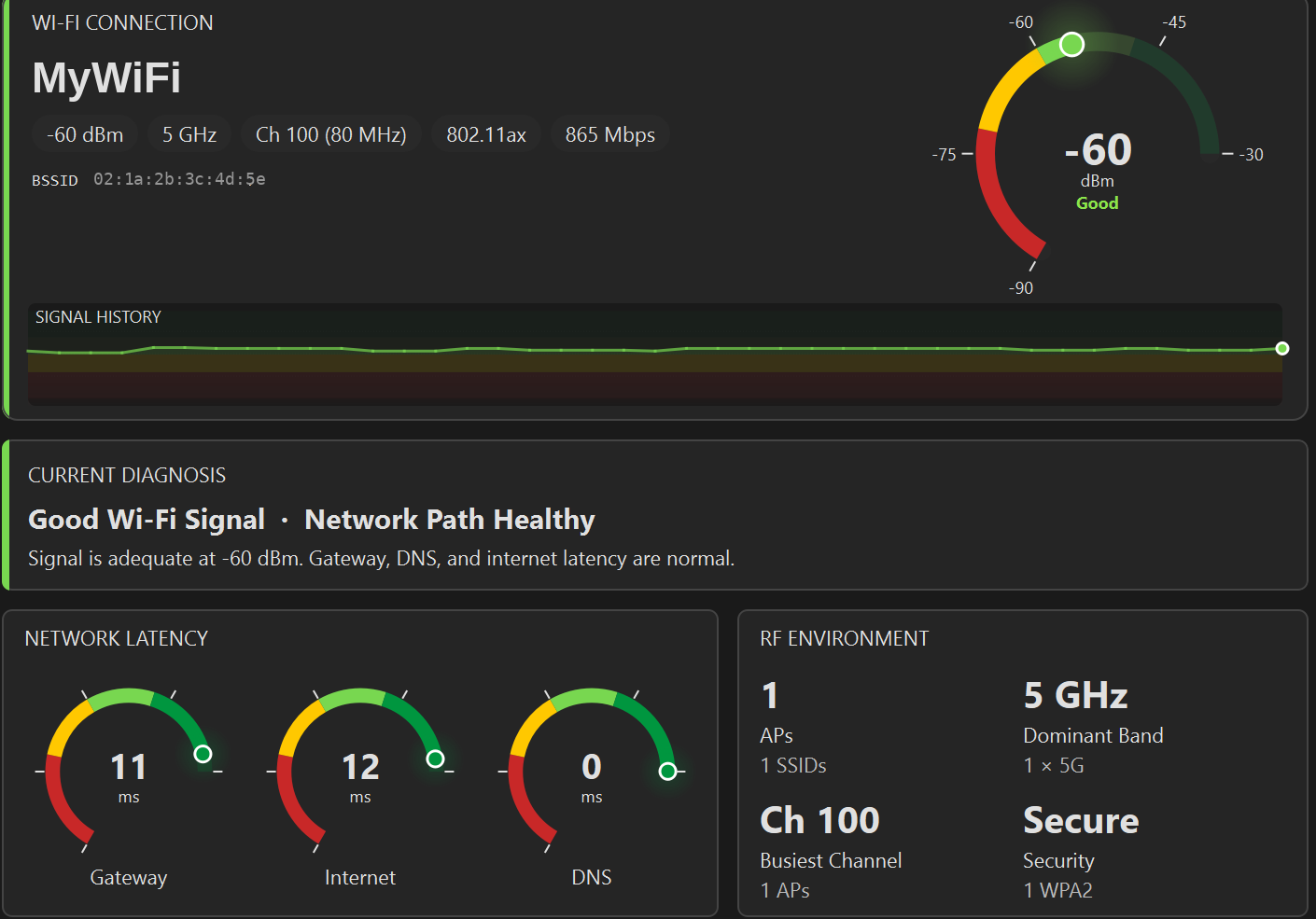
RockWiFi Pro dashboard — live Wi-Fi signal gauge, latency monitors, diagnosis, and RF environment summary

What RockWiFi Pro Does

2.4 GHz channel congestion visualization with overlapping network curves

Channel Congestion

Full spectrum visualization for 2.4, 5, and 6 GHz bands. See exactly which channels are crowded, where networks overlap, and which APs are creating interference.

Per-channel scoring, UNII band labeling, channel recommendations, and AP detail cards make it easy to identify congestion sources and recommend changes to clients.

Nearby APs scanner showing SSIDs, signal strength in dBm, band, channel, and Wi-Fi standard

AP Scanner & UltraScan

See every access point in range with signal strength, band, channel, Wi-Fi standard, and channel width. Continuous background scanning tracks all visible APs over time.

Signal history, stability analysis, 10 sort modes, and CSV/HTML export for thorough site documentation. Know what's in the RF environment before you start troubleshooting.

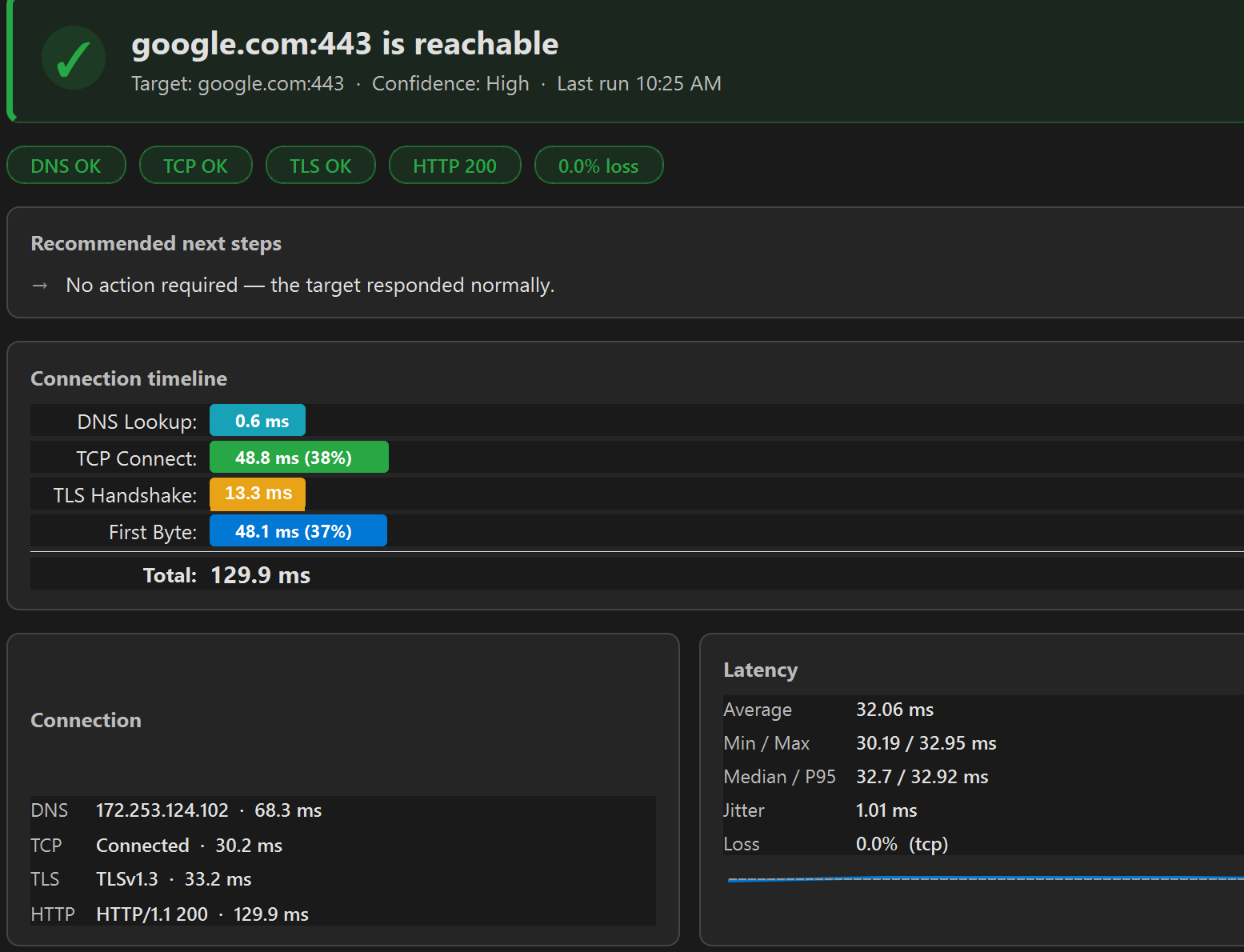
Target Test results showing DNS lookup, TCP connect, TLS handshake, and HTTP response timeline

Target Test

Probe any host or port with ping, TCP connect, HTTP, traceroute, and TLS certificate inspection. A connection timeline breaks down DNS lookup, TCP connect, TLS handshake, and first byte.

Know whether the problem is the network, DNS, the certificate, or the service itself — with actual numbers, not guesswork.

Connection Check

One-click connectivity diagnostic that tests every layer — adapter, gateway, DNS, internet, and HTTPS. Know exactly where the connection breaks in seconds.

Wi-Fi Survey & Heatmaps

Click-to-sample heatmaps on imported floor plans or OpenStreetMap tiles. Kriging interpolation, multi-sample clustering, and guided tour mode for consistent coverage walks.

AP Locator

Hot/cold signal gauge to physically walk to any access point. Pin positions on a floor plan for trilateration. BSS metrics with station count and utilization data.

DNS Compare

Query multiple DNS resolvers side-by-side — system, Google, Cloudflare, Quad9, or custom — and compare results. Spot DNS-level filtering, hijacking, or stale records instantly.

Latency Monitor

Continuous ping chart over time with jitter, loss, and percentile stats. Leave it running during a meeting and come back with proof of intermittent drops.

Flight Recorder

Background logging of connectivity metrics for post-incident analysis. Capture what happened while you were away — latency spikes, packet loss bursts, DNS failures.

Reports & History

Browse past results, export HTML or text reports for client deliverables. Built-in findings engine with per-tool scoring and actionable recommendations.

Wi-Fi 7 Ready

Wi-Fi 7 is rolling out across enterprise and consumer hardware. RockWiFi Pro detects and reports on Wi-Fi 7 capabilities so you can assess readiness, validate deployments, and document upgrade paths — all from a single tool.

6 GHz Band Detection

Full visibility into the 6 GHz spectrum — UNII-5 through UNII-8, covering 1200 MHz of new spectrum. See which access points are broadcasting on 6 GHz and evaluate coverage across all three bands.

320 MHz Channel Width

Detect and report on 320 MHz channel widths introduced by Wi-Fi 7. Identify APs operating at maximum throughput and spot channel width mismatches across your deployment.

Multi-Link Operation (MLO)

Detect MLO-capable access points and report on multi-link status. See which APs are aggregating across bands for higher throughput and lower latency.

Wi-Fi 7 Readiness Scoring

Reports include a Wi-Fi 7 readiness score based on detected capabilities. Know at a glance how prepared a site is for the next generation of wireless.

Upgrade Path Recommendations

The findings engine identifies APs that would benefit from Wi-Fi 7 upgrades and flags hardware still running older standards. Clear, actionable recommendations for client proposals.

How People Use RockWiFi Pro

Client Site Surveys

Import a floor plan, walk the site with guided tour mode, and generate a heatmap showing signal coverage. Export an HTML report the client can read without installing anything.

Troubleshooting Calls

Run Connection Check to isolate the problem layer in seconds. Follow up with Target Test, DNS Compare, or Latency Monitor depending on what the diagnostic surfaces. Arrive at the answer before the user finishes describing the problem.

Post-Incident Documentation

Leave Flight Recorder running overnight or over a weekend. Review the timeline of latency spikes, packet loss, and DNS failures. Export the data and attach it to the ticket.

What You're Getting

No Cloud Required

Everything runs and stores locally. No account sign-up, no cloud sync, no sending floor plans or survey data to external servers.

Simple Monthly Plan

Monthly subscription through the Microsoft Store. Cancel anytime. No long-term contracts, no tier upgrades, no surprise charges.

Free Trial

Full-featured trial so you can evaluate the product in your actual workflow before spending anything. No credit card required.

Professional Output

Exportable HTML reports for client deliverables. Survey heatmaps, diagnostic results, and latency charts that look professional without extra formatting.

Accessible & Powerful

Usable by non-technical users running a quick connection check. Powerful enough for IT pros doing multi-point site surveys with Kriging interpolation.

Direct Support

Email the people who build the product. No ticket queues, no chatbots, no support tiers.

Try RockWiFi Pro free.

Download from the Microsoft Store and run your first survey. See if it fits your workflow.