RockWiFi™ Essentials puts live Wi-Fi analysis, channel congestion maps, continuous AP discovery, and full network diagnostics on every tech's laptop. Plain-language diagnosis tells you what's wrong and what to do next — not just raw numbers.
One-time purchase. No account required. No subscription.
The network tester that belongs on every laptop.
When the Wi-Fi says connected but nothing works, when calls stutter in one room but not another, when the ISP says everything is fine — RockWiFi Essentials walks the whole path and tells you exactly where it broke. Wi-Fi scanning, channel analysis, and network diagnostics in one local-first app.
What RockWiFi Essentials Does
Dashboard
Live Wi-Fi status at a glance — SSID, signal strength, band, channel, Wi-Fi standard, link speed, and a scrolling signal chart. Network latency gauges for gateway, internet, and DNS. RF environment summary with per-band AP counts and channel waterfall heatmap.
UltraScan
Continuous background AP scanner that discovers every nearby access point over time. Signal history sparklines, stability analysis, min/max/avg tracking, 10 sort modes, free-text filter, and export to CSV, HTML, and JSON for site documentation.
Channel Congestion
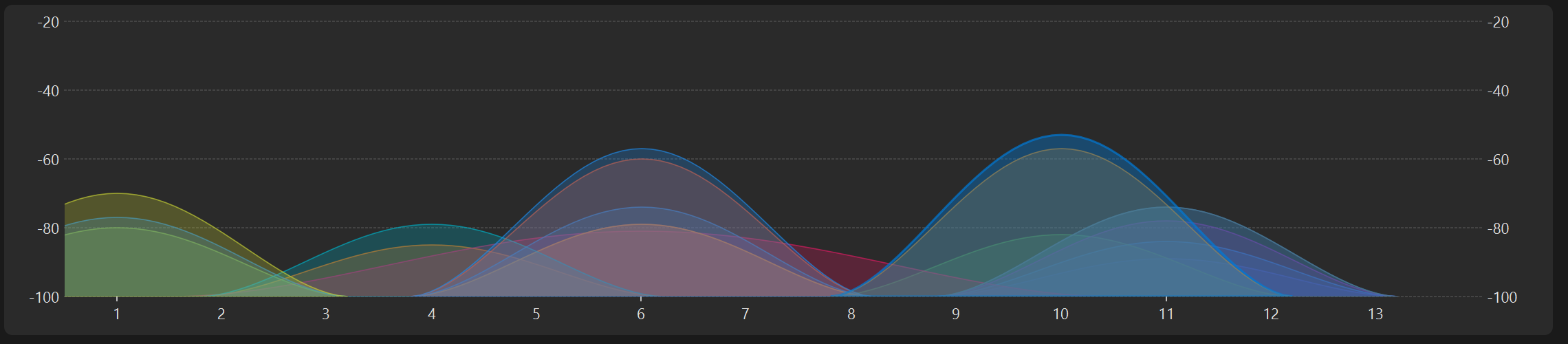
Full spectrum visualization for 2.4, 5, and 6 GHz bands. Per-channel congestion scoring with Low/Medium/High ratings, live waterfall heatmap, UNII band labeling, and best-channel recommendations to find the clearest channel.
Connection Check
Full connectivity diagnostic — adapter, gateway, DNS, public internet, and HTTPS. Plain-language triage tells you the likely issue, the evidence, and what to do next. One click to find exactly where the connection breaks.
Target Test
Probe any host or port with DNS timing, TCP connect, TLS certificate inspection, HTTP response details, traceroute, and latency measurements. Know whether the problem is the network or the service.
DNS Compare
Query multiple DNS resolvers side-by-side — system, Cloudflare, Google, Quad9, and OpenDNS — and compare results. Spot DNS-level filtering, hijacking, or stale records instantly with an agreement verdict.
Latency Monitor
Continuous ping chart with live latency, packet loss, jitter, P95/P99, and trend analysis. Leave it running during a meeting and come back with proof of intermittent drops. Export to CSV.
History & Export
Every test is saved to local history. Export any result to HTML, JSON, or CSV for documentation. Browse, re-run, or delete past results anytime. All data stays on your machine.
Nearby APs & Status Monitor
Always-on docks showing live AP list with signal, band, channel, and standard badges, plus a status strip with BSSID, capabilities, per-channel bar chart, and security summary. Situational awareness without switching tabs.
How People Use RockWiFi Essentials
"The internet is broken."
Run Connection Check. In seconds it tests adapter, gateway, DNS, and the public internet, and tells you in plain language where the problem is. Follow up with Target Test or DNS Compare depending on what surfaces.
"My Wi-Fi is slow in this room."
Channel Congestion shows which channels are crowded and recommends the clearest one. UltraScan builds a nearby AP catalog as you walk, revealing interference sources that a single scan misses.
"I need proof for the ISP."
Run Latency Monitor to capture packet loss, jitter, and latency spikes over time. Export the results to CSV or HTML and attach them to the ticket. Everything stays local — no cloud account needed.
What You're Getting
No Cloud Required
Everything runs and stores locally. No account sign-up, no cloud sync, no sending your data to external servers.
No Subscription
One-time purchase. The license is yours. No annual renewals, no tier upgrades, no surprise charges.
No Telemetry
RockWiFi Essentials does not send telemetry, analytics, or usage data. The app performs standard network checks to diagnose connectivity — it does not upload your data.
Plain-Language Answers
Connection Check, Target Test, and DNS Compare each give a diagnosis with the likely issue, supporting evidence, confidence level, and suggested next steps. Useful for technicians and readable by clients.
Wi-Fi 7 Aware
Detects and reports Wi-Fi 7 (802.11be) capabilities including 6 GHz band, 320 MHz channel width, and Multi-Link Operation across Dashboard, UltraScan, Nearby APs, and Channel Congestion.
Direct Support
Email the people who build the product. No ticket queues, no chatbots, no support tiers.
Need more?
RockWiFi Pro adds floor-plan heatmap surveys with Kriging interpolation, the AP Locator with signal trilateration, long-run Flight Recorder with ISP evidence reports, and a full professional report builder with Executive, Technical, Client, and Full templates.
If you survey sites, locate access points, or deliver reports to clients, RockWiFi Pro is the complete workflow.
RockWiFi Essentials
Wi-Fi scanning, channel congestion, and network diagnostics.